Test

Powered by Blogger.

Sunday, 21 December 2014

Malicious File Extensions


angerous and malicious file extension list

Group of file extensions, which can be dangerous and harmful for your computer, but it may be also a regular program or data files. You should run a virus scan before opening any unknown file type from this group.

Malicious software, also known as malware, is an application or a file, which is harmful to the computer user. Malicious software includes computer viruses, worms, trojan horses, spyware, adware or rootkits.

Computer virus - virus is a program or programming code, which replicates by being copied or initiating its copying to another program, computer boot sector or document. Viruses can be transmitted as attachments to an e-mail note or in a downloaded file, or can be present on a diskette or CD. Some viruses wreak their effect as soon as their code is executed, other lie dormant until circumstances cause their code to be executed by the computer.

Computer worm - worm is a self-replicating virus, which does not alter files, but resides in active memory and duplicates itself. Worms use parts of the operating system that are automatic and usually invisible to the user. It is common for worms to be noticed only after their uncontrolled replication consumes system resources, slowing or halting other tasks.

Trojan horses - trojan horse (also known as trojan), is non-self-replicating malware, which appears to perform a desirable function for the user, while facilitates unauthorized access to the user's computer system.

Spyware - spyware is any technology, which aids in gathering information about a person or organization without their knowledge. Spyware is a program that is installed in someone's computer to secretly gather information about the user and to relay it to advertisers or other interested parties. Spyware can get in the computer as a software virus or as the result of installing a new program.

Adware - adware is any software package, which automatically plays, displays or downloads advertisements to the computer after the software is installed on it or while the application is being used.

Rootkits - rootkit is a collection of programs that enable administrator-level access to a computer or computer network. Typically, a cracker installs a rootkit on a computer after first obtaining user-level access, either by exploiting a known vulnerability or cracking the password. Once the rootkit is installed, it allows the attacker to mask intrusion and gain root or privileged access to the computer and possibly also to other machines in the network.

Sort by: ExtensionSort by: File type description
 file extension gzquarBitDefender quarantine file
bin file icon file extension binCD/DVD binary image file
eml file icon file extension emlEmail message file
exe file icon file extension exeProgram executable file
jar file icon file extension jarCompressed archive file package for Java classes and data file
lnk file icon file extension lnkWindows Shortcut file
dll file icon file extension dllDynamic Link Library file
shs file icon file extension shsMicrosoft Windows Shell Scrap Object file
 file extension sysSystem file
zix file icon file extension zixWinZix compressed archive file
swf file icon file extension swfShockWave Flash, Animated vector format for the Internet
scr file icon file extension scrMicrosoft Windows screensaver file
vsd file icon file extension vsdMicrosoft Visio diagram document file
chm file icon file extension chmMicrosoft compiled HTML help file
 file extension aruAutorun.aru malicious file
bat file icon file extension batBatch file (executable)
ocx file icon file extension ocxActiveX control file
 file extension vexeInfected executable file
js file icon file extension jsJavaScript file
 file extension ozdWin32.TrojanDownloader.Agent.OZD trojan
ini file icon file extension iniText configuration file
wmf file icon file extension wmfWindows metafile format
 file extension scrScript file
ws file icon file extension wsMicrosoft Windows script file
pif file icon file extension pifMicrosoft Windows Program Information File
drv file icon file extension drvMicrosoft Windows device driver
 file extension ctblMalware encrypted file
cpl file icon file extension cplMicrosoft Windows Control Panel file
386 file icon file extension 386Windows virtual device driver
com file icon file extension comCommand executable file
 file extension bukMalicious file
 file extension smtmpTrojan:Win32/FakeSysdef folder
php3 file icon file extension php3PHP version 3 script file
 file extension rsc_tmpTemporary file
class file icon file extension classJava bytecode class file
 file extension exe1Renamed executable file
vbs file icon file extension vbsVisual Basic script file
 file extension smmAmi Pro macro file
wss file icon file extension wssMicrosoft Windows Sound System file
dev file icon file extension devWindows Device Driver file
vbe file icon file extension vbeVisual Basic encoded script file
xlm file icon file extension xlmMicrosoft Excel Macro file
pcx file icon file extension pcxPaintbrush bitmap image
vxd file icon file extension vxdMicrosoft Windows virtual device driver
cmd file icon file extension cmdMicrosoft Windows command script file
 file extension wlpginstallPossible Malware file
 file extension bkdBook Library Local Dos exploit file
vba file icon file extension vbaVisual Basic VBA module file
 file extension dxzTrojan backdoor virus file
 file extension cihChernobyl virus file
 file extension tpsScam torrent file
hlp file icon file extension hlpHelp file
 file extension kcdrshiphop.kcd malware file
 file extension xirBackDoor.Generic9.XIR trojan file
 file extension cryptowallEncrypted file by Cryptowall ransomware
 file extension sopMalware word.sop file
 file extension dyzBackdoor.Win32.ProRat.dyz trojan file
 file extension hlwwin32/AMalum.EDHZ file
wsf file icon file extension wsfMicrosoft Windows scripting file
 file extension fnrTrojan-Dropper.Win32.Flystud.lc. file
 file extension booMicrosoft Booasm.arc encoded file archive
 file extension fjlRootkit.Win32.Agent.fjl virus file
 file extension likTrojan.Win32.Agent.lik file
 file extension s7pSubSeven trojan file
 file extension rhkBackdoor.Win32.Rbot.rhk trojan virus file
 file extension dlbTroj/Dloadr-AHT file
 file extension domDomPlayer malicious file
 file extension tsajnana.tsa malware file
php2 file icon file extension php2PHP version 2 script (HyperText PreProcessor)
pgm file icon file extension pgmPortable graymap file format
 file extension bllVBS/European-A worm file
vb file icon file extension vbMicrosoft Visual Studio Visual Basic script file
 file extension mjzTrojan.Win32.Agent.mjz file
 file extension osaW32/Sober-AD file
 file extension fagWin32.AutoRun.fag
cla file icon file extension claJava Class file
 file extension nlsTroj/Agent-GIS file
 file extensionexe_renamedRenamed EXE file
 file extension bxzitaup.bxz malware file
 file extension mfuBackdoor.Win32.Agent.mfu virus file
vbx file icon file extension vbxMicrosoft Visual Basic Extension file
 file extension eztWorm.Win32.AutoRun.ezt file
 file extension cryptolockerCryptoLocker encrypted file
 file extension iwsTrojan-Downloader.JS.Agent file
wsc file icon file extension wscMicrosoft Windows scripting component file
 file extension dllxBackdoor.Bot file
 file extension dbdDemoShield project file
 file extension uzyBackdoor.Sokacaps file
 file extension xduBackdoor.Win32.PcClient.xdu file
 file extension tkoWin32/Oficla malware file
 file extension dyvWORM_AUTORUN.DYV Worm file
 file extension oarHSQLDB database file
 file extension skaHappy99 virus file
 file extension blfBeast Trojan File
 file extension mjgTrojan file
 file extension txsBeast Trojan file
 file extension ccTrojan Spymaster.A text file
 file extension cfxxePossibly Malware file
atm file icon file extension atmTroj/ProAgent-A
 file extension rnaMalware file
 file extension ttiBeast Trojan file
 file extension upaFake download file
 file extension cxqSillyDl.CXQ downloading trojan file
wsh file icon file extension wshMicrosoft Windows Scripting Host file
 file extension delfMalicious or virus file
xlv file icon file extension xlvMicrosoft Excel VBA module file
 file extension lkhWorm.Generic.LKH virus file
 file extension ce0Winewar worm file
 file extension dliWin32.Sober.AD@mm file
 file extension vzrSinowal.vzr malware file
 file extension spamSpam e-mail message
 file extension ceoWinewar worm file
 file extension fujWorm.Win32.AutoRun.fuj virus file
 file extension xntW32/Sober-AD file
 file extension bmwW32/Liji-A virus file
 file extension ssyW32/Sober-AD file
 file extension lokW32/Rbot-WE log file
 file extension zvzMalware file
 file extension plcLotus add-in functions macros applications
 file extension aeplTrojan file
 file extension qitBackdoor.QIT trojan horse file
 file extension letNuke Randomic Life Generator file
 file extension prW32/Brontok-DP worm file
 file extension pidW32/Yayin-A worm data file
 file extension ivaDementia.4207 virus file
 file extension htsTroj/DelSpy-E file
 file extension hsqQaz Trojan data file
 file extension cywRbot.CYW worm file
 file extension bqfBackdoor.Win32.Ciadoor.bqf trojan file
 file extension autMalware AutoStartup file
 file extension dxWin32/Alureon file

Monday, 15 December 2014

Virtualisation in Red Hat Linux

AT Enterprise Virtualization solution


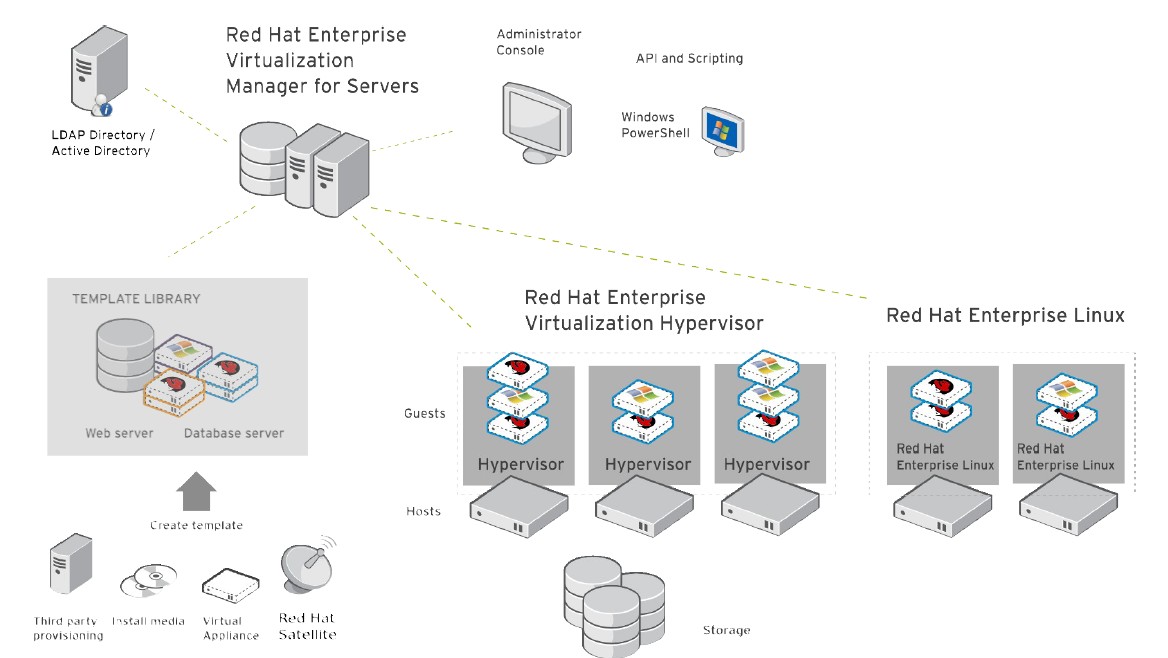
RHEV provides a complete solution for server virtualization management. Red Hat Enterprise Virtualization has been designed from the platform, Red Hat Enterprise Linux, which he extends the functionality, to bring down high barriers facing the ubiquity of virtualization in data centers. Red Hat Enterprise Linux has gained the trust of thousands of organizations and is installed on millions of systems in strategic workloads.


Installing the management console RHEVM

Before installing the management console on the server, verify that the following prerequisites is well respected:


- Operating system: Windows Server 2003 R2 or Windows Server 2008 (recommended)

- The IIS must be installed

- If you are running Windows Server 2003 you must install PowerShell 2.0 available on Windows Update or the Microsoft website.

- Microsoft Frameworks 3.5.1


Once the installation file to launch click Next and accept the terms of use.


Arrived at the above screen make sure all the boxes are checked and click Next.


Select "install a SQL Server 2005 Express Locally" and click next.

Check the installation directory and click next.


Uncheck the box strength SSL and click next


Fill in the requested information


Click next


Port Number: 25285


Click next


Click ignores the Manager installation begins.


 Administration RHEVM


This section shows the procedure to connect to the management console RHEVm


Open your browser enter the address bar:


http: // [ip address or name] / RHEVmanager


If this is not the case install the certificate by clicking the link.


The above screenshot is from the RHEVm authentication interface.


1 Installing RHEV hypervisor.


Boot from ISO hypervisor. After loading the next interface should appear:


Press 1 and input.


Select "configure" grave with the 1 key and confirm with input

Select the disk or hypervisor will install and validate.

Once the task by selecting validate the 3 rdinput (commit configuration).


Once the formatting you complete the wizard redisplay the main menu.

Press 2 (configure authentication)


Select the 1 st entered and enter the root password of the hypervisor.

Do the same for the 2 nd entrance.

Once set select the 3 rd entry to return to the main menu.


Configure the hostname by pressing 3 and then input.

When you ask the interface type the full name of the hypervisor


After configuring the hostname type 4 to configure the network.


Select the network interface configured (usually ETH0)


Type n and then enter


Type n and then enter.


Type S and enter


Configure the IP configuration of the hypervisor by following the instructions on the screen.


Then configure your DNS server in the same way by selecting DNS on the main menu of your hypervisor network configuration.

Do the same for the NTP server.


Select  Save And Return To Menu to return to the main menu.


Then save your RHN machine by pressing 5.

Select 1) Register to public RH n

Perform recording with your Red Hat Account


Once registration is complete RHN press 6 (Configure the host for red hat enterprise).


Type [ip of your server RHEVm]: 80


Then press enter


If communication is established correctly between the 2 machines hypervisor should return the following message:


"The RHEV Manager's address is set"

"The RHEV Manager's harbor is set. Do you even lift


Type [ip RHEVm your server]: 25285

Then press enter.


Once configuration is complete you will be back to the main menu.


Select 8 (install locally and reboot).

Once the installation is complete return on our management console.


If the configuration has been completed, a new HOST should be waiting in your RHEVM interface.

To enable it, right click on it and click approve. The host will be added to the cluster.

If no host is waiting, go to the hypervisor concerned and restarted the VDSM-reg service through the command-reg VDSM Service restart.


2 Configuring the Cluster


Configuring the storage space


Once your hypervisors added to your cluster, you must create a DATASTORE for your hosted VMs.

RHEV is able to manage multipathing fiber channel.

To do this go to the Storage tab and click the New button domain:


Domain Function: DATA

Storage Type: FCP

The list of VMFS will appear. (Do not forget to make the process of creating and VMFS presentation on the interface of the bay).Check VMFS converné and click the ADD button.

Then return to the tab and select DATASTORE on down the STORAGE tab and click the button attach storage.


Then select the VMFS that you have previously set.

This procedure is used to assign to a DataCenter storage esspace.


Repeat the process by creating a storage space with the following parameters:


- Domain function: ISO

- Storage Type: NFS

and attach it to your Data Center. This storage space will store ISO and templates.

The disadvantage is that the storage protocol must be absolutely NFS.


6 Managing ISOs

As we have seen above the ISOs library must have its own dedicated solely DATASTORE using the NFS protocol.

To upload ISOs secure ways REDHAT provides a tool installed with the Manager appointed ISO UPLOADER


ISO UPLOADER automatically detects your DATACENTER parameter is to autonomously for login with your NFS server.

To add an ISO image, click on ADD and select the ISO images you want UPLOADER. Once you have completed your list, click UPLOAD.ISO UPLOADER take charge of incorpérer ISOs directly to your library. We will see below how to exploit it.


On the command line you can also upload a ISO:


rhevm-iso-uploader -iso-domain = ISODomain upload <iso file>


7 Managing VMs


The management of virtual machines is indentique over other virtualisations products.


Create a new VM:


Click the Virtual Machines tab and click New Server:


Here you can set the configuration here "hardware" of your VM.


In this section, you can set the high availabilty system by checking 'Highly Available "

The choices "low", "Medium", "High" to define


In this section, pourez setting boot sequence and assign to your VM ISO you will eventually uploaded through the tool ISO UPLOADER.


After you do this job, click OK.

Once the task of creating the finished vm, it will cause him a disc and a virtual network interface. To do this click on your newly created VM and click "guide me".


Then click on "configure Network Interfaces".Once the parameters indicated as below click OK.

RSS

Categories

Followers

Blog Archive

rTechIndia

RtechIndia->technology ahead

rtech

rtechindia

RtechIndia

Go rtechindia

Go rtechindia

RtechIndia

Sunday, 21 December 2014

Malicious File Extensions


angerous and malicious file extension list

Group of file extensions, which can be dangerous and harmful for your computer, but it may be also a regular program or data files. You should run a virus scan before opening any unknown file type from this group.

Malicious software, also known as malware, is an application or a file, which is harmful to the computer user. Malicious software includes computer viruses, worms, trojan horses, spyware, adware or rootkits.

Computer virus - virus is a program or programming code, which replicates by being copied or initiating its copying to another program, computer boot sector or document. Viruses can be transmitted as attachments to an e-mail note or in a downloaded file, or can be present on a diskette or CD. Some viruses wreak their effect as soon as their code is executed, other lie dormant until circumstances cause their code to be executed by the computer.

Computer worm - worm is a self-replicating virus, which does not alter files, but resides in active memory and duplicates itself. Worms use parts of the operating system that are automatic and usually invisible to the user. It is common for worms to be noticed only after their uncontrolled replication consumes system resources, slowing or halting other tasks.

Trojan horses - trojan horse (also known as trojan), is non-self-replicating malware, which appears to perform a desirable function for the user, while facilitates unauthorized access to the user's computer system.

Spyware - spyware is any technology, which aids in gathering information about a person or organization without their knowledge. Spyware is a program that is installed in someone's computer to secretly gather information about the user and to relay it to advertisers or other interested parties. Spyware can get in the computer as a software virus or as the result of installing a new program.

Adware - adware is any software package, which automatically plays, displays or downloads advertisements to the computer after the software is installed on it or while the application is being used.

Rootkits - rootkit is a collection of programs that enable administrator-level access to a computer or computer network. Typically, a cracker installs a rootkit on a computer after first obtaining user-level access, either by exploiting a known vulnerability or cracking the password. Once the rootkit is installed, it allows the attacker to mask intrusion and gain root or privileged access to the computer and possibly also to other machines in the network.

Sort by: ExtensionSort by: File type description
 file extension gzquarBitDefender quarantine file
bin file icon file extension binCD/DVD binary image file
eml file icon file extension emlEmail message file
exe file icon file extension exeProgram executable file
jar file icon file extension jarCompressed archive file package for Java classes and data file
lnk file icon file extension lnkWindows Shortcut file
dll file icon file extension dllDynamic Link Library file
shs file icon file extension shsMicrosoft Windows Shell Scrap Object file
 file extension sysSystem file
zix file icon file extension zixWinZix compressed archive file
swf file icon file extension swfShockWave Flash, Animated vector format for the Internet
scr file icon file extension scrMicrosoft Windows screensaver file
vsd file icon file extension vsdMicrosoft Visio diagram document file
chm file icon file extension chmMicrosoft compiled HTML help file
 file extension aruAutorun.aru malicious file
bat file icon file extension batBatch file (executable)
ocx file icon file extension ocxActiveX control file
 file extension vexeInfected executable file
js file icon file extension jsJavaScript file
 file extension ozdWin32.TrojanDownloader.Agent.OZD trojan
ini file icon file extension iniText configuration file
wmf file icon file extension wmfWindows metafile format
 file extension scrScript file
ws file icon file extension wsMicrosoft Windows script file
pif file icon file extension pifMicrosoft Windows Program Information File
drv file icon file extension drvMicrosoft Windows device driver
 file extension ctblMalware encrypted file
cpl file icon file extension cplMicrosoft Windows Control Panel file
386 file icon file extension 386Windows virtual device driver
com file icon file extension comCommand executable file
 file extension bukMalicious file
 file extension smtmpTrojan:Win32/FakeSysdef folder
php3 file icon file extension php3PHP version 3 script file
 file extension rsc_tmpTemporary file
class file icon file extension classJava bytecode class file
 file extension exe1Renamed executable file
vbs file icon file extension vbsVisual Basic script file
 file extension smmAmi Pro macro file
wss file icon file extension wssMicrosoft Windows Sound System file
dev file icon file extension devWindows Device Driver file
vbe file icon file extension vbeVisual Basic encoded script file
xlm file icon file extension xlmMicrosoft Excel Macro file
pcx file icon file extension pcxPaintbrush bitmap image
vxd file icon file extension vxdMicrosoft Windows virtual device driver
cmd file icon file extension cmdMicrosoft Windows command script file
 file extension wlpginstallPossible Malware file
 file extension bkdBook Library Local Dos exploit file
vba file icon file extension vbaVisual Basic VBA module file
 file extension dxzTrojan backdoor virus file
 file extension cihChernobyl virus file
 file extension tpsScam torrent file
hlp file icon file extension hlpHelp file
 file extension kcdrshiphop.kcd malware file
 file extension xirBackDoor.Generic9.XIR trojan file
 file extension cryptowallEncrypted file by Cryptowall ransomware
 file extension sopMalware word.sop file
 file extension dyzBackdoor.Win32.ProRat.dyz trojan file
 file extension hlwwin32/AMalum.EDHZ file
wsf file icon file extension wsfMicrosoft Windows scripting file
 file extension fnrTrojan-Dropper.Win32.Flystud.lc. file
 file extension booMicrosoft Booasm.arc encoded file archive
 file extension fjlRootkit.Win32.Agent.fjl virus file
 file extension likTrojan.Win32.Agent.lik file
 file extension s7pSubSeven trojan file
 file extension rhkBackdoor.Win32.Rbot.rhk trojan virus file
 file extension dlbTroj/Dloadr-AHT file
 file extension domDomPlayer malicious file
 file extension tsajnana.tsa malware file
php2 file icon file extension php2PHP version 2 script (HyperText PreProcessor)
pgm file icon file extension pgmPortable graymap file format
 file extension bllVBS/European-A worm file
vb file icon file extension vbMicrosoft Visual Studio Visual Basic script file
 file extension mjzTrojan.Win32.Agent.mjz file
 file extension osaW32/Sober-AD file
 file extension fagWin32.AutoRun.fag
cla file icon file extension claJava Class file
 file extension nlsTroj/Agent-GIS file
 file extensionexe_renamedRenamed EXE file
 file extension bxzitaup.bxz malware file
 file extension mfuBackdoor.Win32.Agent.mfu virus file
vbx file icon file extension vbxMicrosoft Visual Basic Extension file
 file extension eztWorm.Win32.AutoRun.ezt file
 file extension cryptolockerCryptoLocker encrypted file
 file extension iwsTrojan-Downloader.JS.Agent file
wsc file icon file extension wscMicrosoft Windows scripting component file
 file extension dllxBackdoor.Bot file
 file extension dbdDemoShield project file
 file extension uzyBackdoor.Sokacaps file
 file extension xduBackdoor.Win32.PcClient.xdu file
 file extension tkoWin32/Oficla malware file
 file extension dyvWORM_AUTORUN.DYV Worm file
 file extension oarHSQLDB database file
 file extension skaHappy99 virus file
 file extension blfBeast Trojan File
 file extension mjgTrojan file
 file extension txsBeast Trojan file
 file extension ccTrojan Spymaster.A text file
 file extension cfxxePossibly Malware file
atm file icon file extension atmTroj/ProAgent-A
 file extension rnaMalware file
 file extension ttiBeast Trojan file
 file extension upaFake download file
 file extension cxqSillyDl.CXQ downloading trojan file
wsh file icon file extension wshMicrosoft Windows Scripting Host file
 file extension delfMalicious or virus file
xlv file icon file extension xlvMicrosoft Excel VBA module file
 file extension lkhWorm.Generic.LKH virus file
 file extension ce0Winewar worm file
 file extension dliWin32.Sober.AD@mm file
 file extension vzrSinowal.vzr malware file
 file extension spamSpam e-mail message
 file extension ceoWinewar worm file
 file extension fujWorm.Win32.AutoRun.fuj virus file
 file extension xntW32/Sober-AD file
 file extension bmwW32/Liji-A virus file
 file extension ssyW32/Sober-AD file
 file extension lokW32/Rbot-WE log file
 file extension zvzMalware file
 file extension plcLotus add-in functions macros applications
 file extension aeplTrojan file
 file extension qitBackdoor.QIT trojan horse file
 file extension letNuke Randomic Life Generator file
 file extension prW32/Brontok-DP worm file
 file extension pidW32/Yayin-A worm data file
 file extension ivaDementia.4207 virus file
 file extension htsTroj/DelSpy-E file
 file extension hsqQaz Trojan data file
 file extension cywRbot.CYW worm file
 file extension bqfBackdoor.Win32.Ciadoor.bqf trojan file
 file extension autMalware AutoStartup file
 file extension dxWin32/Alureon file

Monday, 15 December 2014

Virtualisation in Red Hat Linux

AT Enterprise Virtualization solution


RHEV provides a complete solution for server virtualization management. Red Hat Enterprise Virtualization has been designed from the platform, Red Hat Enterprise Linux, which he extends the functionality, to bring down high barriers facing the ubiquity of virtualization in data centers. Red Hat Enterprise Linux has gained the trust of thousands of organizations and is installed on millions of systems in strategic workloads.


Installing the management console RHEVM

Before installing the management console on the server, verify that the following prerequisites is well respected:


- Operating system: Windows Server 2003 R2 or Windows Server 2008 (recommended)

- The IIS must be installed

- If you are running Windows Server 2003 you must install PowerShell 2.0 available on Windows Update or the Microsoft website.

- Microsoft Frameworks 3.5.1


Once the installation file to launch click Next and accept the terms of use.


Arrived at the above screen make sure all the boxes are checked and click Next.


Select "install a SQL Server 2005 Express Locally" and click next.

Check the installation directory and click next.


Uncheck the box strength SSL and click next


Fill in the requested information


Click next


Port Number: 25285


Click next


Click ignores the Manager installation begins.


 Administration RHEVM


This section shows the procedure to connect to the management console RHEVm


Open your browser enter the address bar:


http: // [ip address or name] / RHEVmanager


If this is not the case install the certificate by clicking the link.


The above screenshot is from the RHEVm authentication interface.


1 Installing RHEV hypervisor.


Boot from ISO hypervisor. After loading the next interface should appear:


Press 1 and input.


Select "configure" grave with the 1 key and confirm with input

Select the disk or hypervisor will install and validate.

Once the task by selecting validate the 3 rdinput (commit configuration).


Once the formatting you complete the wizard redisplay the main menu.

Press 2 (configure authentication)


Select the 1 st entered and enter the root password of the hypervisor.

Do the same for the 2 nd entrance.

Once set select the 3 rd entry to return to the main menu.


Configure the hostname by pressing 3 and then input.

When you ask the interface type the full name of the hypervisor


After configuring the hostname type 4 to configure the network.


Select the network interface configured (usually ETH0)


Type n and then enter


Type n and then enter.


Type S and enter


Configure the IP configuration of the hypervisor by following the instructions on the screen.


Then configure your DNS server in the same way by selecting DNS on the main menu of your hypervisor network configuration.

Do the same for the NTP server.


Select  Save And Return To Menu to return to the main menu.


Then save your RHN machine by pressing 5.

Select 1) Register to public RH n

Perform recording with your Red Hat Account


Once registration is complete RHN press 6 (Configure the host for red hat enterprise).


Type [ip of your server RHEVm]: 80


Then press enter


If communication is established correctly between the 2 machines hypervisor should return the following message:


"The RHEV Manager's address is set"

"The RHEV Manager's harbor is set. Do you even lift


Type [ip RHEVm your server]: 25285

Then press enter.


Once configuration is complete you will be back to the main menu.


Select 8 (install locally and reboot).

Once the installation is complete return on our management console.


If the configuration has been completed, a new HOST should be waiting in your RHEVM interface.

To enable it, right click on it and click approve. The host will be added to the cluster.

If no host is waiting, go to the hypervisor concerned and restarted the VDSM-reg service through the command-reg VDSM Service restart.


2 Configuring the Cluster


Configuring the storage space


Once your hypervisors added to your cluster, you must create a DATASTORE for your hosted VMs.

RHEV is able to manage multipathing fiber channel.

To do this go to the Storage tab and click the New button domain:


Domain Function: DATA

Storage Type: FCP

The list of VMFS will appear. (Do not forget to make the process of creating and VMFS presentation on the interface of the bay).Check VMFS converné and click the ADD button.

Then return to the tab and select DATASTORE on down the STORAGE tab and click the button attach storage.


Then select the VMFS that you have previously set.

This procedure is used to assign to a DataCenter storage esspace.


Repeat the process by creating a storage space with the following parameters:


- Domain function: ISO

- Storage Type: NFS

and attach it to your Data Center. This storage space will store ISO and templates.

The disadvantage is that the storage protocol must be absolutely NFS.


6 Managing ISOs

As we have seen above the ISOs library must have its own dedicated solely DATASTORE using the NFS protocol.

To upload ISOs secure ways REDHAT provides a tool installed with the Manager appointed ISO UPLOADER


ISO UPLOADER automatically detects your DATACENTER parameter is to autonomously for login with your NFS server.

To add an ISO image, click on ADD and select the ISO images you want UPLOADER. Once you have completed your list, click UPLOAD.ISO UPLOADER take charge of incorpérer ISOs directly to your library. We will see below how to exploit it.


On the command line you can also upload a ISO:


rhevm-iso-uploader -iso-domain = ISODomain upload <iso file>


7 Managing VMs


The management of virtual machines is indentique over other virtualisations products.


Create a new VM:


Click the Virtual Machines tab and click New Server:


Here you can set the configuration here "hardware" of your VM.


In this section, you can set the high availabilty system by checking 'Highly Available "

The choices "low", "Medium", "High" to define


In this section, pourez setting boot sequence and assign to your VM ISO you will eventually uploaded through the tool ISO UPLOADER.


After you do this job, click OK.

Once the task of creating the finished vm, it will cause him a disc and a virtual network interface. To do this click on your newly created VM and click "guide me".


Then click on "configure Network Interfaces".Once the parameters indicated as below click OK.